
Why Your SaaS Product Pages Aren’t Ranking, and How to Tell What’s Actually Wrong
A lot of SaaS companies end up in the same odd spot. The SaaS product pages not ranking, while the blog ranks for dozens of industry topics. Organic traffic climbs, yet the pages that describe what the company actually sells get almost no search visibility.
The usual reaction is to work on the product page itself: more copy, new headings, another target keyword, maybe a link-building push. Sometimes that is the right call. Often it is a guess because nobody has checked what is actually holding the page back.
The cause might be surprisingly simple, such as a technical issue left over from staging. It might be a gap between the language your company uses and the language buyers use. The page might be targeting a query Google consistently serves with a different type of result. Or the product page may sit almost completely outside the authority and context your informational content has built.
That is why I would not start by rewriting the page. I would diagnose the problem first, beginning with the cheapest things to rule out.
Start With the Boring Checks
Before doing any strategy work, spend an hour checking the things that can quietly break commercial pages.
Product and feature pages often go through a more complicated publishing process than blog posts. Design, development, product, and marketing may all touch them, sometimes under launch pressure. That creates more opportunities for technical problems to sneak through.
| Check | How to Look | What a Problem Looks Like |
|---|---|---|
| Is the page indexed? | Inspect the URL in Google Search Console. | “Discovered, currently not indexed,” or Google has selected a different canonical URL. |
| Noindex or canonical tags | View the source and check the robots meta tag and canonical link. | A noindex tag left from staging or a canonical pointing somewhere else. |
| Is important copy in the HTML? | Compare the source with the rendered page or rendered HTML in URL Inspection. | Important content appears only after JavaScript runs and is missing from Google’s render. |
| Internal links and crawl depth | Crawl the site and review inlinks and click depth. | The page has very few internal links, sits several clicks deep, or is primarily linked through navigation. |
| Title tag and H1 | Read them without assuming you know the product. | A branded feature name that never plainly explains what the feature does. |
| Near-duplicate pages | Search a distinctive sentence and review templated variants. | Several nearly identical pages for industries, integrations, features, or plans. |
If you find something here, fix it before rebuilding your content strategy around the page. A canonical mistake does not need a new content cluster. It needs the canonical fixed.
Google provides additional guidance for diagnosing canonicalization issues, including using URL Inspection to see which URL Google considers canonical and checking for technical misconfigurations.
Your Page May Describe the Product in Words Buyers Don’t Use
A blog post usually has a fairly simple job. It answers a question or explores a specific problem.
A product page has to explain the product, communicate its value, distinguish it from alternatives, address objections, and encourage a conversion. It may also need approval from product, sales, leadership, and whoever named the feature three years ago and remains deeply attached to that name.
By the time the page ships, the language often reflects how the company thinks about its product rather than how buyers describe their problem.
Suppose a feature is called “Intelligent Workflow Orchestration.” That might be an accurate internal name, but prospective customers could be searching for “automated client onboarding,” “approval workflow software,” or “reduce manual handoffs.”
Adding another 500 words about Intelligent Workflow Orchestration will not fix that disconnect.
You do not have to guess what language buyers use. Some of the best sources are already available to you:
- Sales calls and notes, particularly how prospects describe their problem before your team introduces product terminology
- Free-text responses on demo and contact forms
- Support tickets and onboarding conversations
- Reviews of your product and competitors on G2, Capterra, and similar platforms
- Questions prospects repeatedly ask during evaluation
- The words customers use to describe what they were doing before they found your product
You can keep the branded feature name. Just make sure the title, H1, opening copy, and surrounding context also explain the capability in language a buyer would recognize.
This is one place where Decision-First SEO differs from simply assigning a keyword to a page. The starting point is not “What phrase can we make this page rank for?” It is “What is the buyer trying to understand or decide when this page becomes relevant?”
Sometimes There Isn’t Meaningful Search Demand for the Page
This is worth checking before investing heavily in ranking a product or feature page.
If your company is creating a new category, or the page centers on a proprietary feature that only your company calls by that name, there may be little or no non-branded search demand for it.
That does not mean the page has failed.
Its primary job may be converting people who arrive through other routes: outbound, referrals, email, paid campaigns, branded searches, or another page on the site. Trying to force that page into an organic acquisition role can waste months.
In that situation, put more search effort into the problems and use cases people actually search for. Those pages can create discovery, while the product page supports evaluation once buyers understand what they need.
Knowing the difference matters because not every important page needs to be a landing page from organic search.
Why SaaS Product Pages Not Ranking Can Be an Intent Problem
Commercial keywords are not interchangeable.
A phrase containing “software,” “platform,” or “solution” might look ideal for a product page in a keyword tool. Search for it, however, and the results may be dominated by roundups, marketplaces, review sites, category pages, or comparison content.
That is useful information about the decision behind the search.
Consider three queries:
- “customer onboarding software”
- “automate customer onboarding”
- “[competitor] alternatives”
Each search could eventually lead to someone buying the same SaaS product. But those people are not making the same decision.
The first may be comparing products in an established category. The second is still exploring how to solve a problem. The third has already identified another vendor and is actively evaluating alternatives.
They should not automatically land on the same page.
Before optimizing a product page around a commercial keyword, inspect the search results. If Google overwhelmingly returns list articles and comparison sites, a standalone product page may struggle regardless of how carefully you optimize it.
Your options might include creating a comparison or category resource, earning inclusion in relevant third-party lists, or targeting a more specific query where product pages already appear.
Decision-First SEO does not eliminate keyword or SERP analysis. It changes where those tools fit in the process. First identify the decision. Then determine which page type best supports it and which searches represent it.
Blog Authority Often Never Reaches the Product Page
Imagine a project management platform with strong articles about workload planning, missed deadlines, resource allocation, and team capacity.
Those articles rank. Some have earned backlinks. They link to one another and collectively establish considerable relevance around the problems the product solves.
The workload-management feature page gets one link from the main navigation and another from a product overview.
The company has built authority around the problem while leaving the solution outside much of that structure.
I would start with the supporting content that already has value. Identify which relevant articles receive organic traffic, which have earned backlinks, and which are closely connected to the problem the product page solves.
Then add contextual links where the product genuinely becomes useful to the reader. Use descriptive anchor text such as “workload management view” rather than “click here” or a forced exact-match phrase.
The relationship should also work in the other direction. A visitor who lands directly on a feature page but is not ready to evaluate a product may benefit from a guide explaining the underlying problem.
A rough pathway might look like:
Resource allocation guide → workload planning content → workload management feature page → comparison, pricing, or demo
But that is a map, not a set of train tracks. Buyers jump around. Someone may enter through pricing, return three days later through a comparison search, read two articles, visit G2, ask an AI assistant about the category, and then return directly to the product page.
Decision-First internal linking is about supporting those movements, not forcing everyone through one prescribed funnel.
Why a Thinner Competitor Page Can Outrank Yours
Few things are more irritating than watching a competitor rank above you with a page that appears to contain half the information.
Word count is rarely a useful explanation on its own.
Instead, compare things you can actually investigate:
- Referring domains pointing to the page and domain
- Relevant internal links pointing to the page
- Title and H1 alignment with the query
- The type of page Google currently rewards for that search
- Overall brand demand and recognition
- Whether supporting content reinforces the product’s relationship to the topic
- Whether the competitor has stronger third-party mentions, reviews, or category visibility
If the competitor’s advantage is primarily authority, adding another 1,000 words to your page is unlikely to close the gap.
For a smaller SaaS company, a specific use-case, integration, or problem-oriented query may also offer a better opportunity than fighting a much stronger brand for the broadest category term.
This is another reason diagnosis matters. “Their page is thinner than ours” describes what you can see. It does not explain why they rank.
Give Each Commercial Page One Job
SaaS sites accumulate pages over time. Eventually, you can end up with a product page, two feature pages, a solutions page, and an industry page all trying to rank for some variation of “invoice automation software.”
That is often described as keyword cannibalization, but there is a more useful way to look at it: nobody clearly assigned the pages different roles in the buyer’s decision.
| Page Type | Question the Buyer Is Asking | Typical Search |
|---|---|---|
| Product or solution | What does this do, and is it for me? | “AP automation software” |
| Feature | Can it do this specific thing? | “invoice approval workflow” |
| Use case | Does it fit my situation? | “invoice automation for construction companies” |
| Integration | Will it work with what we already use? | “QuickBooks invoice automation” |
| Comparison / alternatives | How does it compare with another option? | “[Competitor] alternatives” |
| Pricing | What will this cost? | “[Product] pricing” |
| Demo | Can I see how it works? | Usually branded, navigational, or direct |
Decide which page owns the primary topic. Give related pages more specific jobs and consolidate pages that are genuinely duplicative.
That gives your internal linking structure a reason to exist beyond distributing authority. Each link can help the buyer reach the page that answers the next likely question.
What Decision-First SEO Looks Like in Practice
Consider an accounts-payable SaaS company selling invoice-processing automation.
The blog covers manual invoice processing, AP errors, slow approvals, invoice fraud, and processing costs. Organic traffic looks healthy, but the commercial pages receive little search visibility.
Before rewriting the product page, map the decisions buyers make around it.
| Buyer Stage | What the Buyer Needs to Know | Content That Answers It | Useful Next Step |
|---|---|---|---|
| Recognizing the problem | Why does invoice processing take so long? | Article on manual AP bottlenecks | Automation guide |
| Exploring solutions | Can approvals be automated? | Guide to invoice workflow automation | Evaluation criteria |
| Setting criteria | What should this software actually do? | Buyer’s guide | Feature and use-case pages |
| Evaluating vendors | Will this handle our workflow and integrate with our ERP? | Product, feature, integration, and comparison pages | Proof and pricing |
| Making the decision | Is this worth implementing, and what happens after we buy? | Pricing, case studies, comparisons, implementation content | Demo or sales conversation |
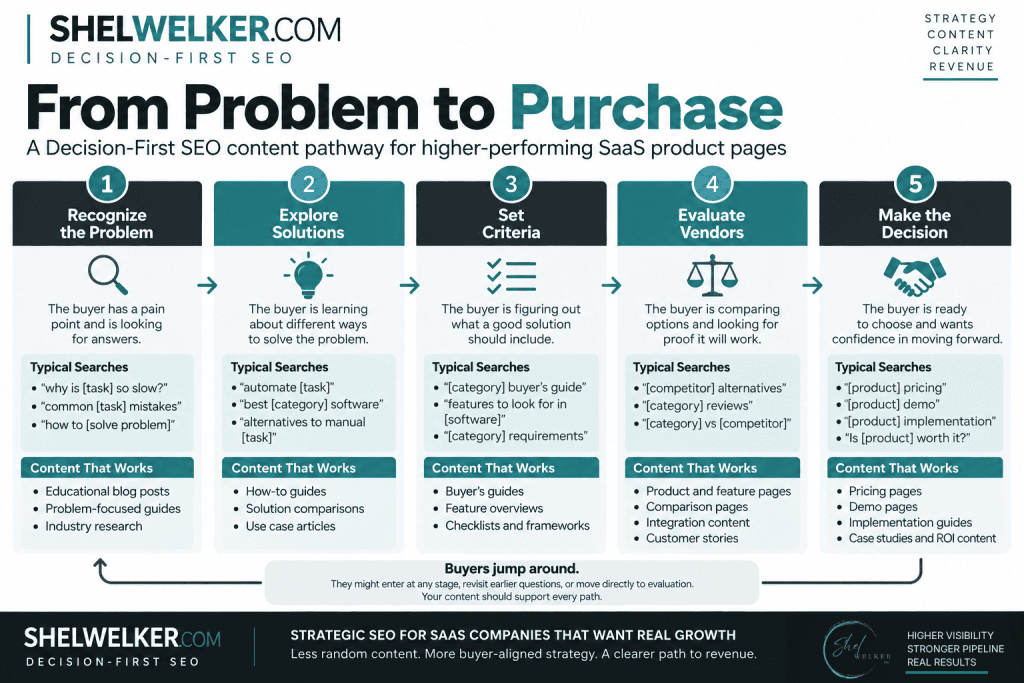
Now the content structure is doing more than creating traffic.
The article about AP bottlenecks connects naturally to automation because that is a question the buyer is likely to ask next. Evaluation content establishes what matters when choosing a solution. Feature and integration pages provide evidence that the product can meet those requirements. Pricing, proof, and implementation content reduce the remaining uncertainty around buying it.
This is the practical core of Decision-First SEO. Keyword research, technical SEO, internal linking, content strategy, and commercial pages are not new tactics. The difference is organizing those tactics around the decisions they need to support instead of treating each one as an independent SEO activity.
It also helps expose gaps. SaaS companies rarely lack awareness content. The missing pieces often appear closer to evaluation and purchase because comparison, integration, implementation, and proof content require input from product, sales, customer success, and actual customers.
Those pages are harder to produce. They are also often the pages buyers need when the decision becomes serious.
What About AI Search and Retrieval?
There is a reasonable case for making the relationships between your product, category, features, use cases, and buyer problems as clear as possible beyond traditional Google rankings.
Buyers now research across search engines, AI-generated answers, LLMs, review platforms, communities, and vendor sites. Those systems do not all work the same way, and nobody outside the companies operating them can credibly tell you exactly how much an internal link or particular content structure affects whether a SaaS product appears in an AI-generated answer.
That uncertainty is a reason to avoid creating an entirely separate strategy based on speculation.
What you can control is consistency. Your website, product pages, supporting content, review profiles, third-party descriptions, and other public information should make it reasonably easy to understand what your company does, what category it belongs to, which problems it solves, and who it is designed for.
That is useful whether the information is being interpreted by a prospective customer, a traditional search engine, or an AI retrieval system.
What I’d Fix First
A small SaaS team cannot fix everything at once, and it usually should not try.
I would work in this order:
- Run the technical checks on your most valuable commercial pages. There is no reason to debate content strategy while an important page is accidentally noindexed.
- Define the search and decision role of each page. Identify the primary query where search demand exists, then inspect the actual results to see whether your page type fits.
- Compare the language with how buyers actually talk. Use sales calls, demo forms, reviews, support conversations, and customer interviews rather than relying entirely on keyword tools.
- Connect existing authority to commercial pages. Start with relevant blog content that already has traffic, backlinks, or strong visibility and add useful contextual links.
- Fill the largest decision-stage gap. That may be a comparison page, integration page, use-case page, implementation resource, or something else buyers need before they can confidently choose.
- Measure more than the ranking. Watch Search Console impressions and clicks for the pages you changed, but also track organic demo requests, signups, assisted conversions, and movement through the commercial pages.
Some changes, particularly titles and internal links, may begin showing movement relatively quickly. New pages and larger structural changes need more time, and low-volume commercial searches may never produce impressive traffic numbers.
That is fine if the traffic they do produce is closer to revenue.
Product Page Rankings Are a Diagnosis, Not a Strategy
A product page that does not rank may simply need better optimization. It may also be technically blocked, targeting a query with the wrong page type, using language buyers never use, competing against much stronger domains, or trying to rank for something nobody searches for.
And sometimes the page itself is perfectly reasonable. What is missing is everything around it.
That distinction is why I approach these problems through Decision-First SEO. The goal is not to replace technical SEO, keyword research, content strategy, or internal linking with another branded set of tactics. It is to give those tactics a common organizing question: what does the buyer need in order to make the next decision?
Once that is mapped, it becomes much easier to see whether the problem is the product page, the content supporting it, the search opportunity you chose, or a missing part of the buying path.
That same diagnostic process is built into my SaaS SEO Blueprint, which maps buyer stages, revenue-focused search opportunities, decision-content gaps, and internal linking priorities before deciding what should be created next. The point is not to produce more SEO work. It is to identify which work is actually worth doing.